
Capture before it disappears.
No required title, folder or tag. Type and press Enter to save on desktop; use Shift+Enter for another line. Paste a link, drop an image, or let a whole brain dump land.
Drop a thought, a screenshot, a link, a list. Drift keeps it in reach, and helps the threads find each other.
A little room to explore. No account needed for examples.A garden water sensor beside the tomatoes. Just a quiet nudge when the soil is dry.
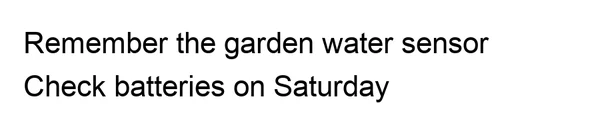
An earlier idea. A fresh nudge. A thread you can keep following.
Your original words, still here.No perfect system to maintain.
Just a notebook that makes room.
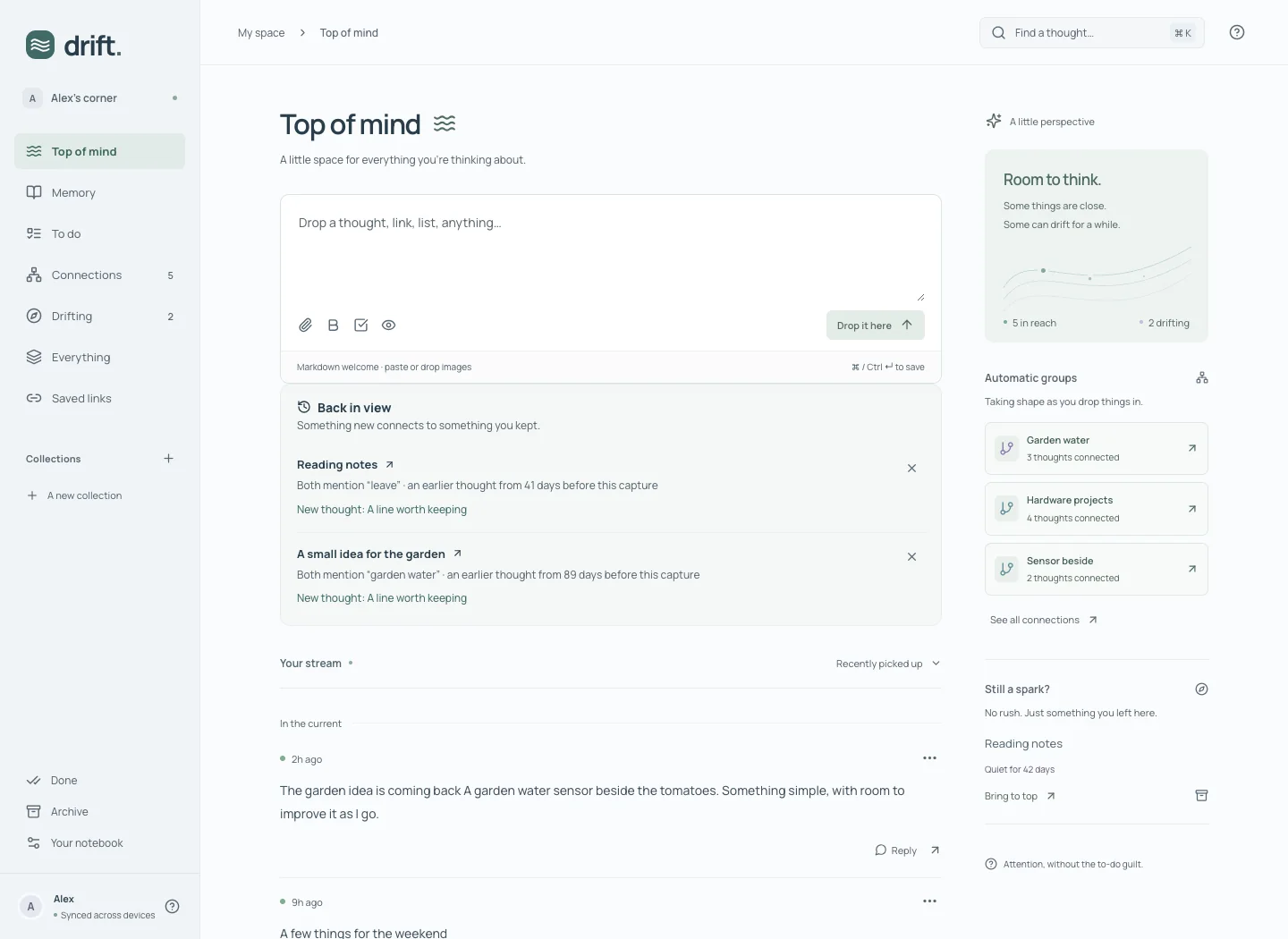
Some things need you now. Some can wait. Your notebook can make space for both.
No required title, folder or tag. Type and press Enter to save on desktop; use Shift+Enter for another line. Paste a link, drop an image, or let a whole brain dump land.
Editing, replying and checking something off bring a note closer. Just reading it doesn’t reshuffle your stream.
Quiet notes stay searchable. Nothing becomes overdue just because you haven’t thought about it for a while.
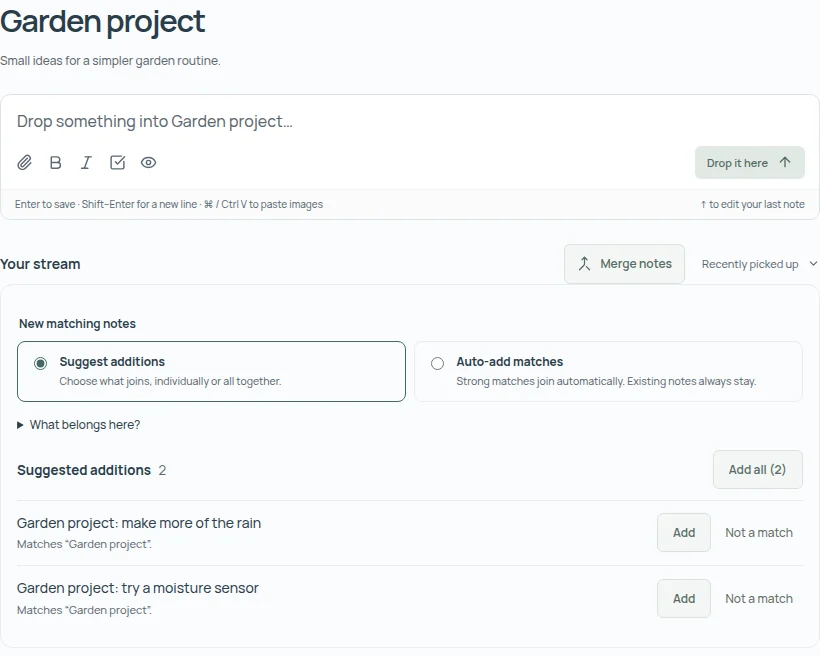
Start with a few notes, or save a connection as a collection. New matches find their way back to that same collection, guided by its name, description and the notes you choose.
Choose Suggest additions to review what joins, individually or with Add all. Choose Auto-add matches to let strong matches join for you. You can change modes whenever you like.
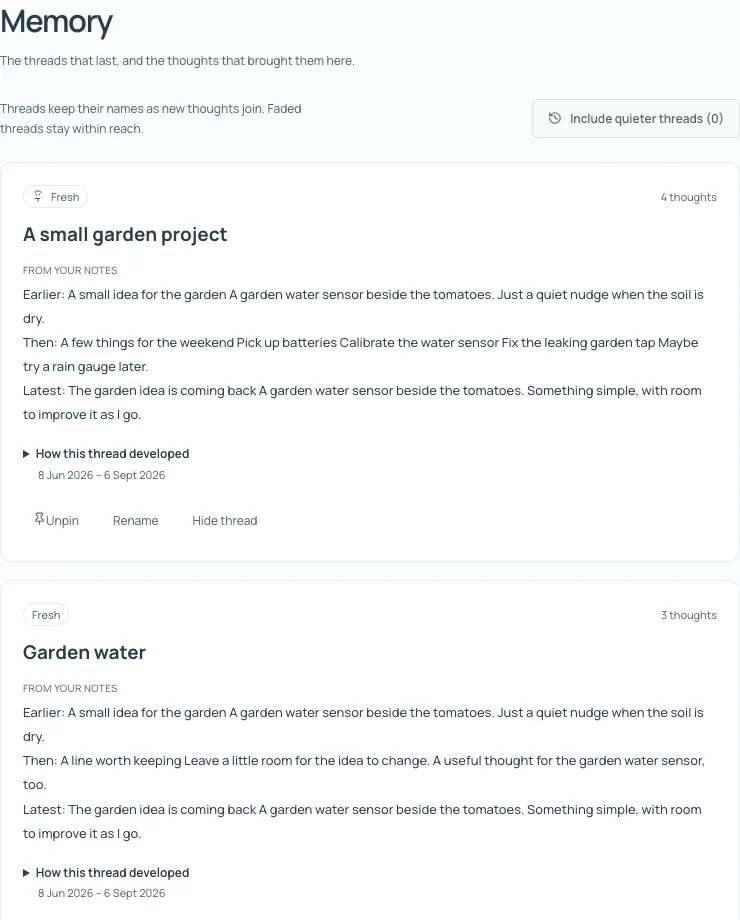
An idea from months ago can matter again today. Memory connects related notes and brings earlier thoughts back beside a new capture.
Follow excerpts from the original sources. Give the thread a name, pin it, or let it grow quieter. The words you saved stay yours to revisit.
Threads work without optional AI. With it enabled, recurring threads can get a short overview, grounded in the notes you saved.
A week of small thoughts can hold a bigger idea. Taking shape looks across your recent notes for themes, loose ends and possible next steps.
Open the notes behind a suggestion, or add a next step to To do. You can leave it as a thought, too.
Generate it when you want a little perspective. Nothing becomes a task until you choose Add.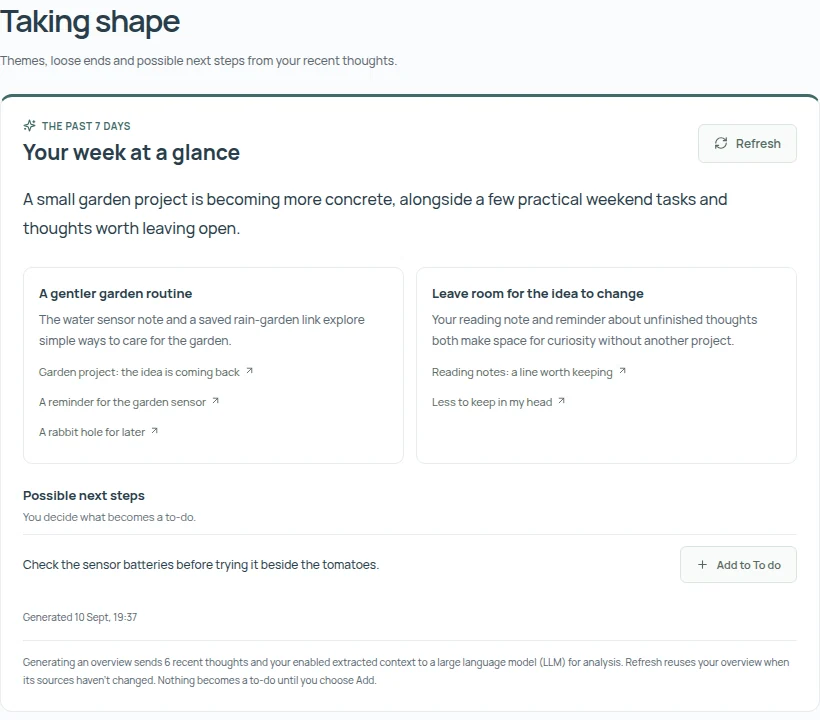
A checklist is a commitment. A thought that sounds like an action begins as a suggestion. You decide what belongs in To do.
Open actions stay until you finish or dismiss them. Complete a checklist item here and its original checkbox updates too.
“Maybe try a rain gauge later” can stay a maybe.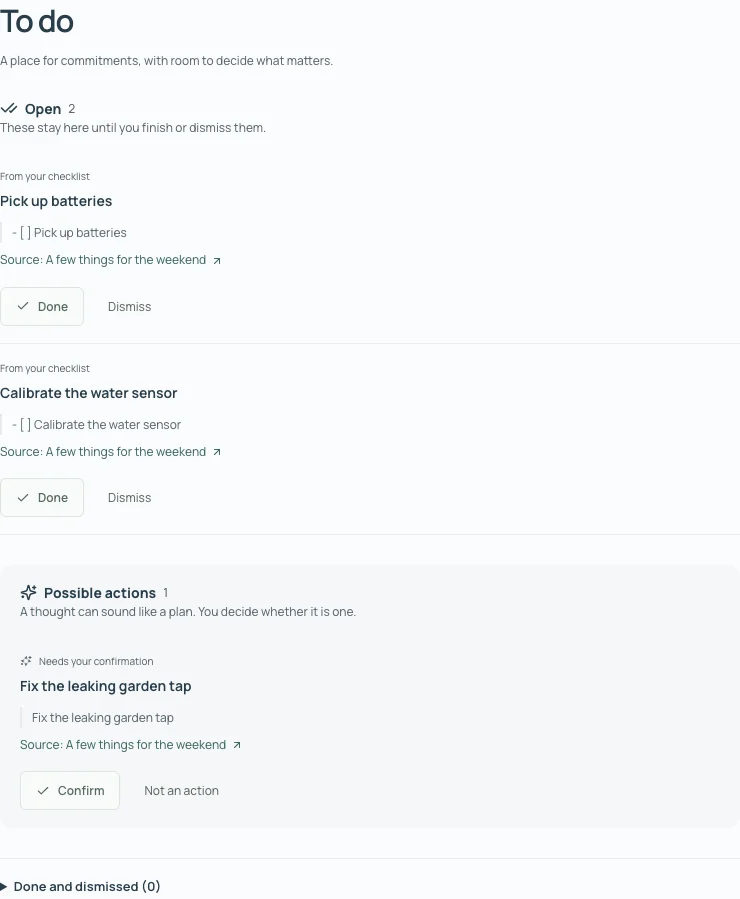
A screenshot you’ll need again. A useful link. A thought that arrives on the way somewhere else.
Capture from the web, or share into the native app. On iOS, a share can land without opening the main app. Android sharing opens a capture for you to confirm.
Native captures can wait offline and upload when you reconnect. Collections and their matching choices sync when you’re connected, too.
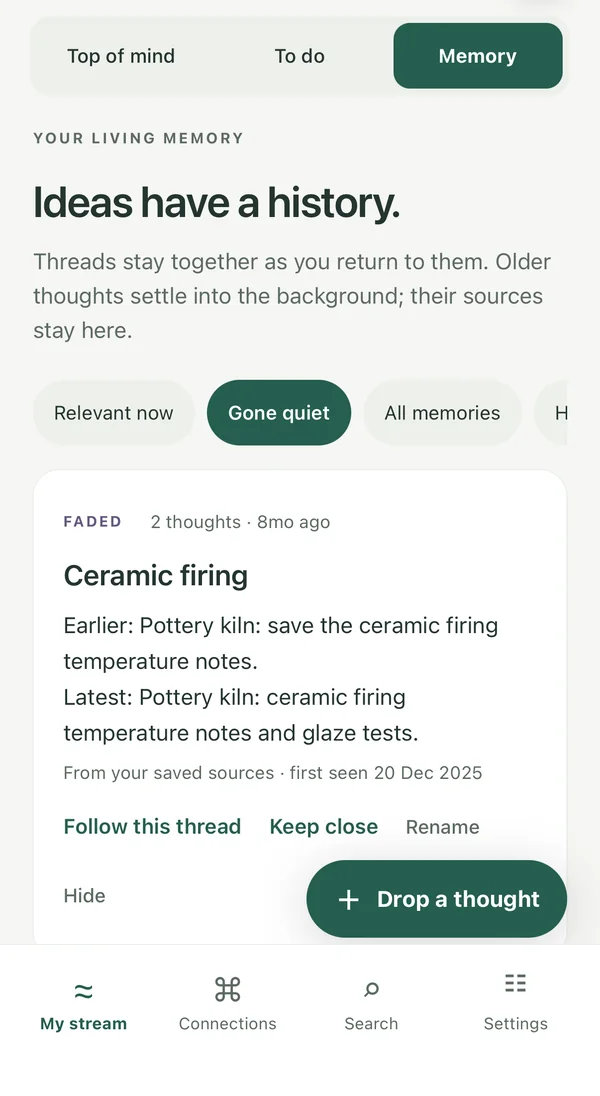
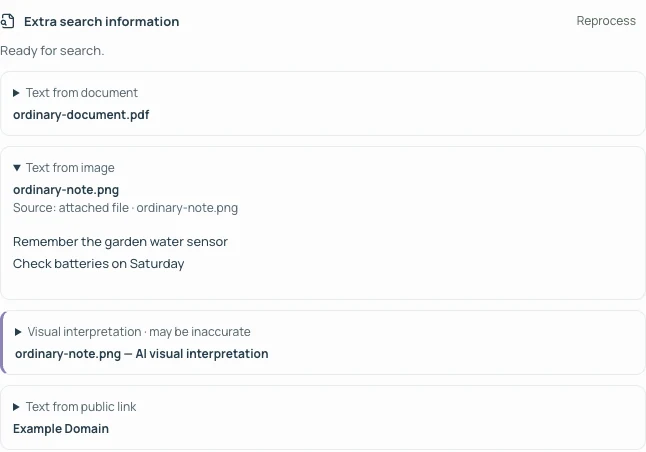
You remember “Saturday,” but not which screenshot it was in. Drift can read text in screenshots and documents so those little details can lead you back.
Search words, replies, tags and filenames together. With public-link reading enabled, available page text and preview details can lead you back to a saved link, too.
Opt in to related-meaning search, smarter connections or image descriptions when models are available. Interpretations stay labelled, and your original capture stays intact.
Your notebook works without AI. Opt in for these extras.
| Feature | No AI | With AI |
|---|---|---|
| Notes, collections & To do | Included | Included |
| Automatic connections & groups | Included | Included |
| Search & connect by meaning | Not included | Included |
| Richer topic names | Not included | Included |
| Memory summaries | Not included | Included |
| Image descriptions | Not included | Included |
| Taking shape: themes & next steps | Not included | Included |
AI is off by default. If enabled, relevant text or images are sent to an LLM. Privacy details.
Connect Claude Code or Codex to your notebook, then ask about something you saved, drop in a new thought, or tidy up repeats. Claude works from your own notes and links back to them.
“What did I note about the garden speakers?”
Claude answers from your notes, with a link back to each one it used.
“Remember to book the tram tour.”
Your words are saved as they are, after Claude checks for a similar note or the same to-do already on your list.
“What links to the tiny amplifier idea?”
Related notes, and why each one connects.
“Merge my repeated kiln notes.”
Claude shows you the combined note first and asks before merging. A merge can be separated again.
Sign in and open Settings → Connect AI tools. Choose read only or read and write, then create the token.
It’s shown once, so copy it straight away. You can revoke it there at any time, and changing your password revokes every token.
Run the command Settings shows in your terminal. It already includes your token and keeps it in your own Claude Code settings, not in a project.
claude mcp add --scope user --transport http notebook https://notebook-api.mikegoodfellow.co.ukRecommended. The skills teach Claude to check before adding a note and to ask before tidying. Then start a new Claude Code session.
claude plugin marketplace add https://notebook.mikegoodfellow.co.ukCodex setup is also in Settings, under “Use with Codex”. These commands work in Claude Code; the skills need version 2.1.224 or later. The Claude apps on the web, desktop and phone need a sign-in flow that isn’t built yet. Reading never changes your notes, and Claude asks before merging notes or editing your words.
Keep a private notebook with an account, or start with examples on this device. Choose which extra processing your account uses.
Across your devicesAccount notes, attachments, collection choices and Memory decisions sync when connected.
A say in what gets processedPublic-link reading and text extraction start on for new accounts; turn either off in Your notebook. Optional AI starts off and needs your opt-in.
Room to change your mindHide a thread, reject a suggestion, archive or delete a note, or export your words.
Plain answers, before you make yourself at home.
No title, tag, date or collection is required. Drop something into your stream and carry on. Connections find related notes. Save one as a collection, or start a collection yourself, when there is a group you want to keep.
Choose Suggest additions to review new matches, or Auto-add matches to let strong matches join automatically. You can change modes at any time. Add suggestions individually or use Add all for the displayed set, with Undo if you change your mind. Saving a connection keeps one collection that continues to find matches. Automation only adds notes; it never removes members.
Its name, description and the notes you deliberately add guide future matches, without optional AI. Removing a note or choosing Not a match keeps it excluded from that collection until you reconsider or add it back. Confirm automatic additions with These fit to use them as examples too. These choices guide your collection; they do not train an AI model.
It stays in your notebook. Recent deliberate activity keeps a note near the top; quieter notes remain searchable. Memory threads can grow quieter too, and you can include them again or pin one to keep it close. Fading never deletes your words.
No. Checklists become open actions. Other possible commitments from your own writing are suggestions for you to confirm or dismiss. Questions and maybes are treated conservatively. Text in screenshots, linked pages and image interpretations cannot create tasks.
No. Capture, merging notes, collections, remembered context, shared-word connections, Memory threads and checklist actions work without optional AI. You can opt in to finding related meaning, richer topic names, Memory overviews, Taking shape and image descriptions when models are available. You choose whether to use them.
Yes. The combined writing, tags and remembered context help matching and Memory update, even without AI. With optional AI enabled, the combined note is processed again for meaning-based connections. Originals stay in source history and you can separate them again. Merging is your choice to bring notes together; it does not turn their contents into confirmed facts.
Memory keeps related notes together in lasting threads, with original excerpts and your choices about thread names, pins and hidden threads. You can remember a name, its aliases and a little context, such as “Sunday Walks is my walking group”, then edit or forget it. Names and aliases work without optional AI; enabled models can also use relevant context. Drift does not automatically turn its guesses into facts about you.
An account keeps your notebook and attachments private to that account and syncs them through its server. Your server can read saved notes to provide sync, search and processing. Public-link reading is optional: the linked website receives a request. Optional models receive the text or images needed for the feature you enable.
With public-link reading enabled, Drift looks for a title, description, thumbnail and available page text. It can also use previews supplied by sites such as Reddit, YouTube, Vimeo and Spotify. Some links remain unavailable, and a preview does not include every post, article or video transcript. Public-link reading starts on for new accounts; you can turn it off in Your notebook.
Yes. The example notebook stays in this browser and has local search. An account adds sync, Memory and background processing. Importing browser notes into an account is a separate choice; Drift does not silently move them.
The web app works on a small screen. iOS and Android development builds also support native capture, sharing and both collection modes; store downloads are not offered here yet. Native captures can queue offline and cached notes stay readable. Saving to an account, changing collection membership or settings, and updating Memory need a connection.
You can export notebook content as Markdown or a JSON backup with attachments, within the export limits. JSON also preserves collections, their modes and their matching choices. Remembered context has its own JSON export. Memory decisions, custom thread titles, pins and hidden states are stored separately and are not included in the browser backup.
Yes, from Claude Code or Codex. Create an access token in Settings → Connect AI tools, add your notebook to your chosen tool, then ask in plain words. A read-only token can’t change anything, and Claude asks before merging notes or editing your words. The Claude apps on the web, desktop and phone can’t connect yet. See how to connect.
Give it a little space. Find your way back when you’re ready.